
How to Manage Multiple Social Media Accounts in One Place
Managing multiple social media accounts can quickly become overwhelming. You open Facebook to publish a post, switch to Instagram to upload another,…
Read article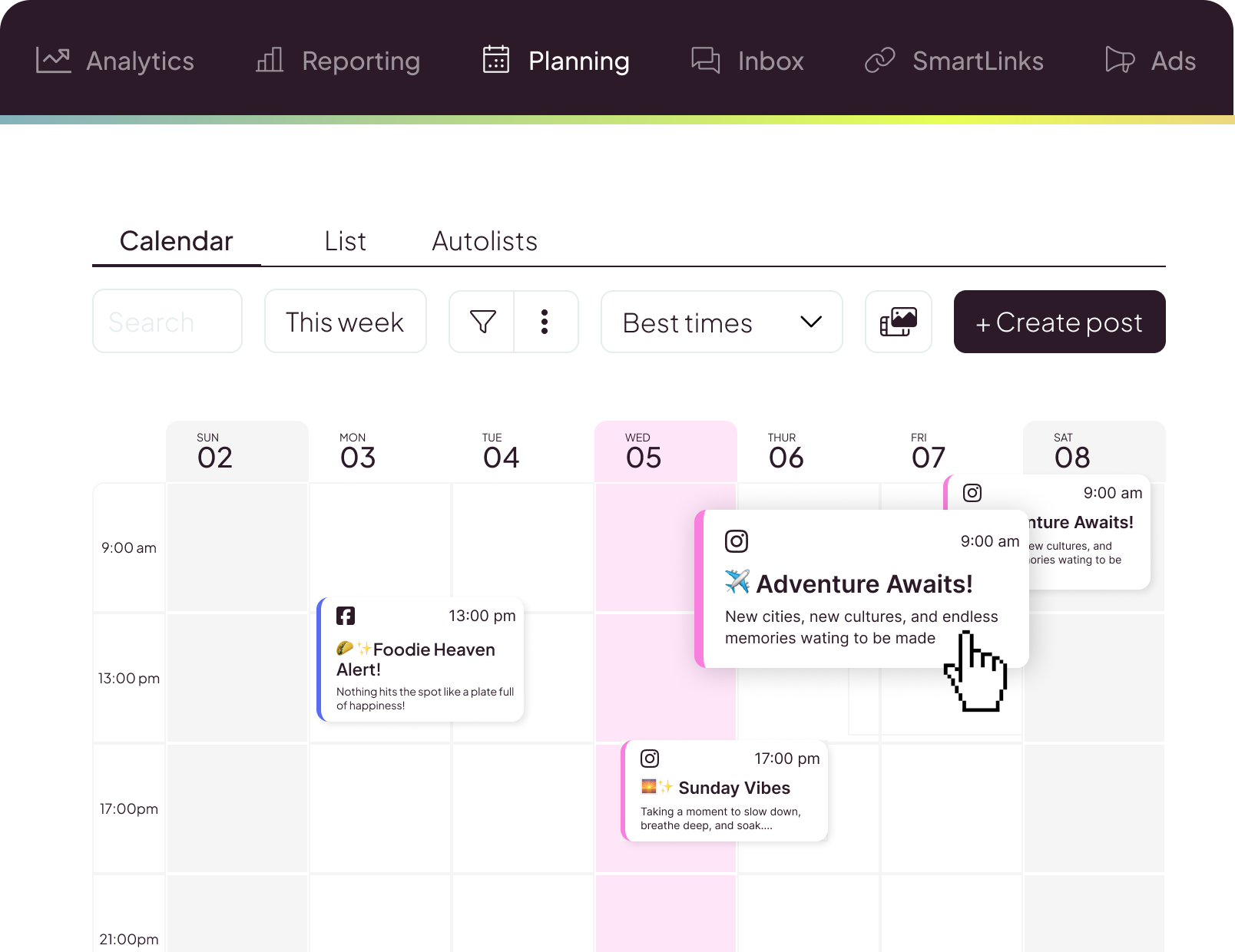
Looking for a simpler way to plan, publish, and analyze social media content? This complete guide explains how Metricool works, what it costs, and how beginners can use it to organize their social media workflow.
Imagine running an online business, building a personal brand, or managing a website. You have a Facebook Page to update, an Instagram account to maintain, TikTok videos to publish, Pinterest Pins to create, and perhaps a YouTube channel to manage.
Every platform has its own interface and publishing process. You write a caption in one application, upload an image in another, publish a video somewhere else, and then switch between dashboards to find out how your content is performing.
Before you realize it, social media management has become a job of its own. The problem isn’t necessarily a lack of content ideas. It’s the time and effort required to organize everything.
You need a publishing schedule. You need to remember when each post should go live. You need to monitor performance. And you need a practical way to maintain consistency without spending your entire day switching between applications.
What if you could manage multiple social media accounts in one place instead of organizing every publishing task separately?
That’s where a social media management tool can help. Metricool is a platform designed to bring many social media management activities into one workspace. Its features include content planning, scheduling, analytics, competitor research, reporting, and other digital marketing tools.
The precise capabilities available depend on your subscription, connected accounts, and the publishing features supported by each platform. Instead of managing every part of your social media workflow separately, you can use Metricool to organize much of your work through a centralized dashboard.
But is it the right choice for you? Can beginners use it? Does the free plan offer enough functionality? What can you actually do with it? And what limitations should you understand before paying for a subscription?
In this guide, we’ll answer those questions step by step. You’ll learn what Metricool does, how its major features work, how to schedule your first posts, how to review analytics, and how to determine whether the platform is worth trying.
Whether you’re a content creator, blogger, freelancer, small business owner, or social media manager, this guide will help you evaluate the tool.
Ready to explore a more organized social media workflow?
You can explore Metricool and compare its available features with your requirements.
You can begin by reviewing the free plan if it meets your needs. There is no reason to commit to a paid subscription before you understand which features you actually require.
Metricool is an online social media management and digital marketing platform. Its purpose is to help users plan, manage, and measure their social media activities without having to handle every task independently across multiple applications.
Imagine that you manage Facebook, Instagram, Pinterest, and TikTok for a small business. Without a management tool, you might open each application separately whenever you need to publish something. You would also need to visit different analytics dashboards to examine the results. Metricool can help consolidate much of this activity.
Depending on your subscription, connected accounts, and platform-specific limitations, you can use it to:
Metricool also provides AI-assisted content tools and integrations for supported workflows.
For a detailed overview, visit the official Metricool product guide:
No. Metricool is a management tool that works with supported social media platforms. It does not replace those platforms themselves.
Your audience still interacts with your content on the original networks.
For example, someone who sees your Facebook post will interact with it on Facebook. Someone who discovers your Pinterest Pin will interact with it on Pinterest.
Metricool provides an additional workspace for organizing publishing activities and reviewing the data made available through its integrations.
This distinction is important.
The platform can help reduce repetitive management work, but it does not eliminate the need to understand how each social network operates.
Metricool may be useful for people who manage social media regularly and want a more organized publishing process.
Its usefulness depends on your workflow, rather than simply the size of your audience.
Creators often need to balance content production with audience engagement, collaborations, and other responsibilities.
A scheduling calendar can help organize upcoming content rather than requiring you to decide what to publish every day.
Analytics can also help you evaluate your content instead of relying entirely on follower counts or individual posts that happen to receive attention.
Bloggers often distribute articles across multiple social networks.
A single article can become a Facebook post, a Pinterest Pin, a Threads update, or a short video.
Metricool can help organize this distribution process across supported platforms.
For example, a blogger who publishes software reviews could schedule social media posts that direct interested readers to useful articles on their website.
Freelancers frequently manage their own marketing while serving clients.
If you run a consulting business, freelance design service, or personal brand, maintaining a consistent social media presence can be difficult.
Metricool can help you plan content in advance and review performance data from connected accounts.
Small businesses need to promote products and services while managing everyday operations.
A content calendar can help organize educational posts, announcements, promotions, and customer updates.
Instead of creating everything at the last minute, businesses can prepare a schedule and review it before publication.
Professionals managing several clients need more than a place to write captions.
They may need additional Brands, collaboration features, reporting capabilities, and post approval workflows.
Metricool’s paid plans offer options for more demanding workflows. Check the official pricing page to identify the relevant limits and features:
Affiliate marketers often need to distribute educational content, tutorials, reviews, and comparisons across multiple platforms.
Metricool can help organize that publishing workflow, but scheduling more posts does not guarantee affiliate sales.
The quality of the content, relevance of the audience, usefulness of the destination page, and clarity of the recommendation remain important.
Metricool supports a range of social media networks and digital marketing integrations.
Its available connections include major platforms such as Facebook, Instagram, Threads, TikTok, Pinterest, YouTube, LinkedIn, X, Bluesky, and other supported services.
The actual capabilities vary by network and plan.
For example, a social network may allow third-party tools to publish certain formats while restricting other features through its API.
Before building your workflow around a particular network, review the official platform feature overview:
You can also read Metricool’s documentation about platform restrictions:
Read Metricool’s API limitations documentation
Facebook is useful for business announcements, educational posts, promotions, community updates, and other content.
Metricool can help schedule supported posts to a connected Facebook Page and review the available performance data.
Instagram is commonly used for images, carousels, Stories, and Reels.
Metricool supports several Instagram publishing workflows, but the precise method depends on the format and platform requirements.
Some formats support automatic publishing, while others require manual steps.
Threads is useful for text-based updates and discussions.
A publishing calendar can help you organize supported Threads posts alongside other planned content.
TikTok focuses heavily on short-form video.
Metricool can help organize video ideas, captions, and publishing dates for supported TikTok workflows.
Pinterest is useful for visual content distribution.
Bloggers and businesses can create Pins that direct relevant readers to tutorials, product comparisons, and website articles.
A publishing calendar can help organize these Pins instead of leaving uploads to the last minute.
YouTube supports video publishing and audience development.
Metricool offers supported YouTube management and analytics features, subject to the connected account and plan.
LinkedIn may be particularly relevant for consultants, professional services, and business-to-business marketers.
LinkedIn access is not included in Metricool’s Free plan, so review the paid plan details if LinkedIn is important to your workflow.
Connecting multiple platforms to one management tool does not mean every feature available in the original application becomes available through Metricool.
Social networks impose technical restrictions on third-party integrations.
Some content formats, interactions, and analytics may be unavailable or require manual publishing.
Metricool explains these limitations in its official API documentation:
Read Metricool’s API limitations documentation
Scheduling allows you to prepare posts before their intended publication time.
Instead of opening a social media application every time you want to publish something, you can organize supported content in Metricool’s planner.
A typical process involves choosing the destination account, preparing a caption, adding media, selecting a date and time, and scheduling the post.
This can be useful if you want to maintain a consistent publishing schedule without creating every post at the last minute.
For example, a small business might prepare three posts for the coming week: an educational tip on Monday, a tutorial on Wednesday, and a product update on Friday.
The posts can be organized in advance so the owner can review the schedule before publication.
Read Metricool’s official scheduling tutorial:
Open the official scheduling tutorial
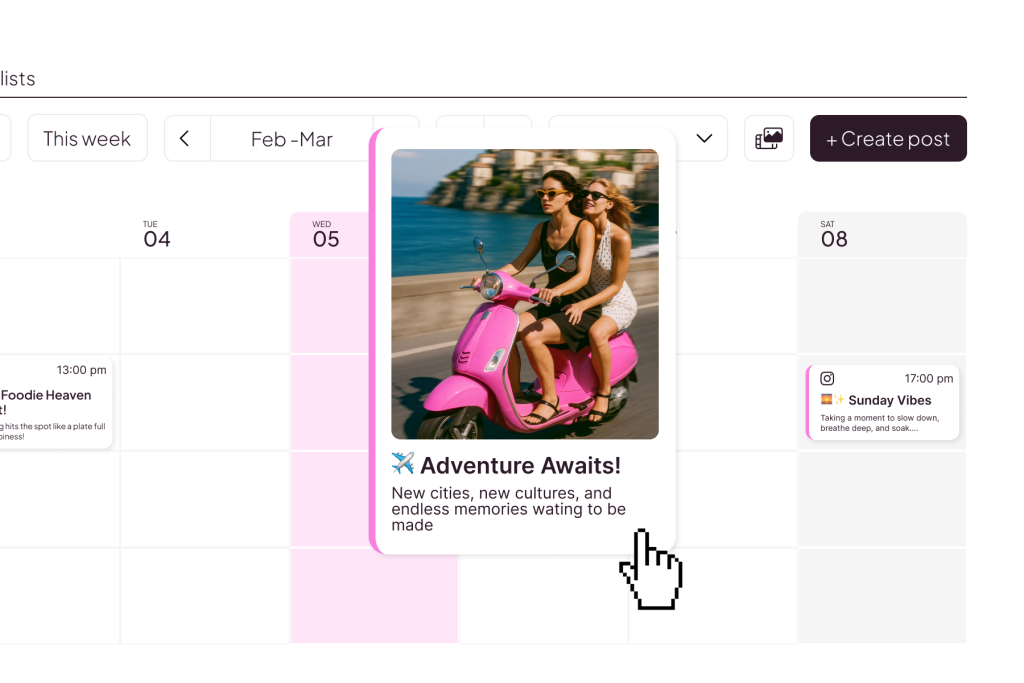
A content calendar provides a visual overview of planned posts.
Instead of keeping every publishing date in your memory, you can organize upcoming content in one place.
This is useful when a campaign contains several related posts.
For example, a product launch might involve an announcement, a tutorial, a frequently asked questions post, and a reminder.
The calendar helps you see how those posts fit together.
It can also reveal gaps in your schedule.
If you notice that you have several promotional posts but no educational content, you can correct the imbalance before publishing.
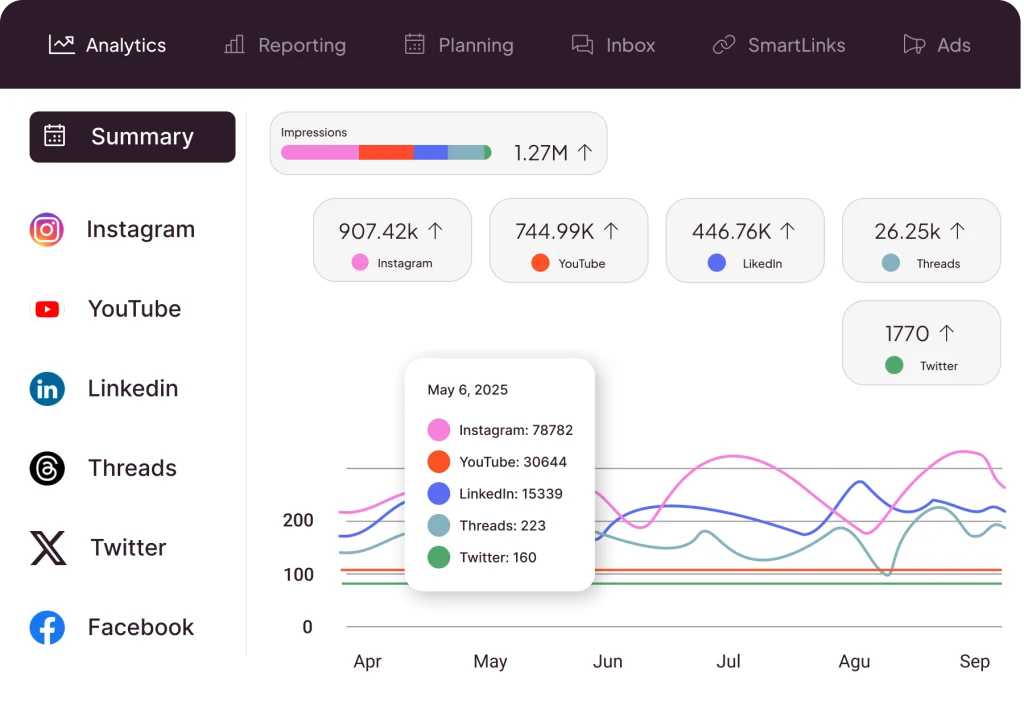
Scheduling helps you publish content. Analytics helps you understand what happens afterward.
Metricool provides access to performance information from connected platforms, subject to each network’s available data and your plan.
Depending on the platform, the available metrics may include engagement, reach, impressions, audience growth, clicks, and other performance indicators.
The usefulness of each metric depends on your objective.
If your goal is to increase awareness, reach and impressions may be useful.
If you want people to interact with your content, engagement metrics may matter more.
If you’re promoting an article, relevant clicks and website visits may be more meaningful.
For affiliate marketing, social engagement alone is not enough to prove that your content generates revenue. You may also need website analytics and suitable conversion tracking.
Read Metricool’s official analytics documentation:
Open the official analytics documentation
Publishing time can influence when your audience sees a post.
Metricool offers a best-times feature for supported networks and accounts.
Instead of relying only on generic advice, you can review the recommended publishing times available for your account.
A practical approach is to test a few suitable time slots, publish comparable content, and review the results over time.
Don’t assume that a suggested publishing time guarantees higher engagement.
Content quality, audience relevance, competition, and other factors still influence performance.
Use the recommendations as a starting point, then examine your own data.
Competitor analysis helps you understand what other relevant accounts are doing.
Depending on your plan and connected network, Metricool can help you review selected competitor profiles and their available performance indicators.
This can help you identify content opportunities.
For example, several competitors in your niche might publish product announcements but rarely explain how those products solve a specific problem.
That gap may present an opportunity to create educational tutorials.
The purpose is not to copy another brand’s content.
It is to understand your market, observe relevant patterns, and create more useful content for your audience.
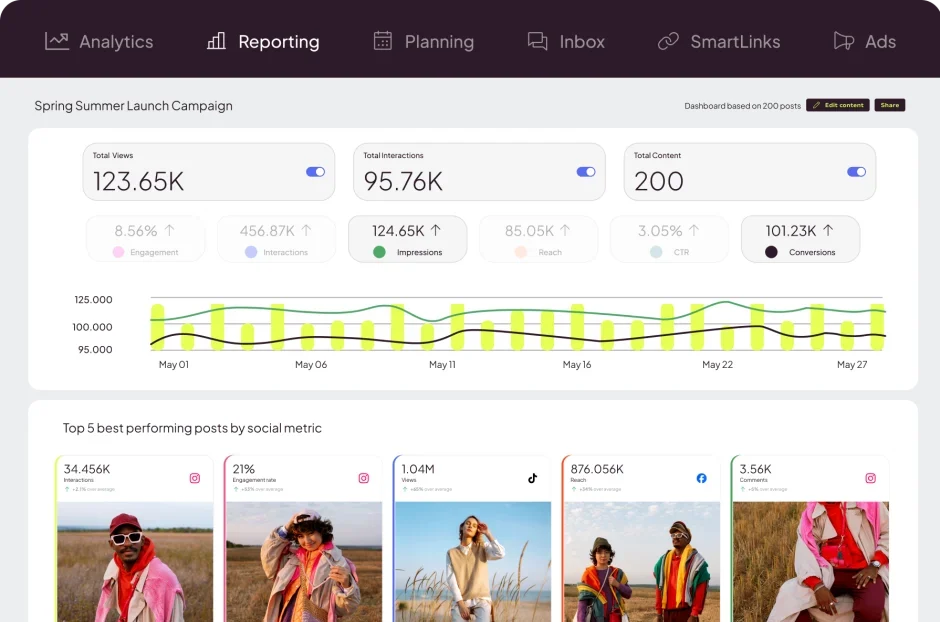
Reports are useful for businesses, freelancers, and agencies that need to communicate their results.
Instead of manually collecting figures from separate dashboards, you can use Metricool’s reporting features where available.
A useful report should explain what you wanted to achieve, what content was published, what results were observed, and what actions should be tested next.
For example, a report might show that educational posts attracted more meaningful engagement than generic promotional messages.
The next step could be testing more educational content, not simply recording the numbers.
Reporting capabilities depend on your plan.
The Free plan does not include downloadable PDF or PowerPoint reports. Check the official pricing page before choosing a subscription:
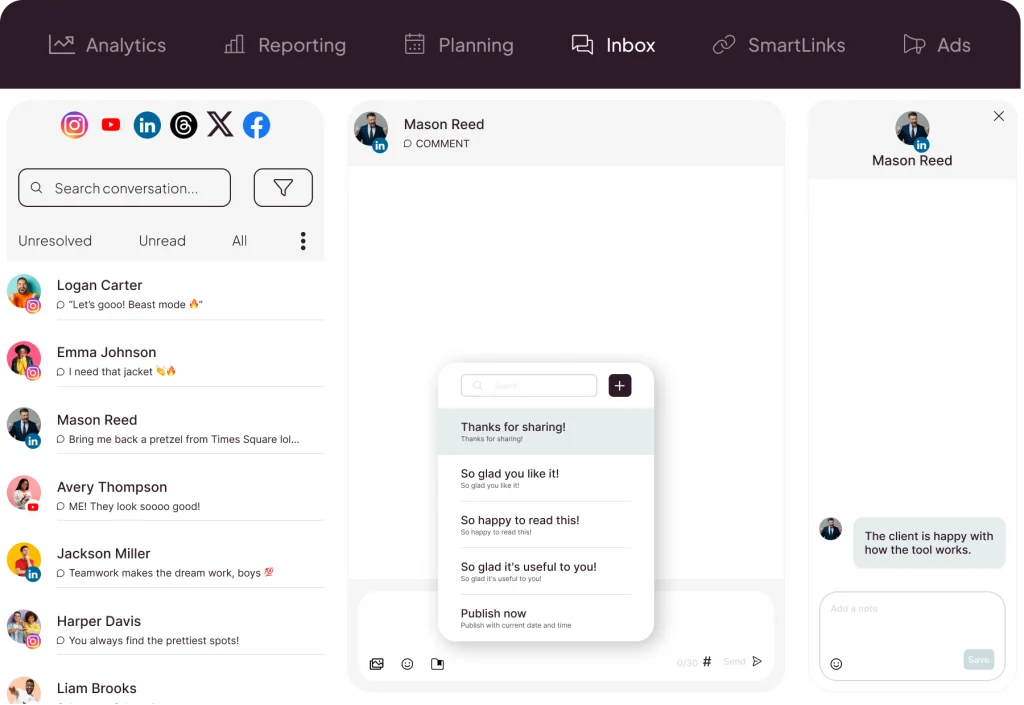
Publishing content is only part of social media marketing.
You may also need to respond to questions, review comments, and maintain relationships with your audience.
Metricool offers inbox functionality for supported platforms and interactions.
This can help organize certain community-management activities in the same workspace as your other social media tasks.
For example, you might review comments at a scheduled time each day, respond to questions, and identify recurring topics that could inspire new educational posts.
However, the supported messages and interactions vary by network.
Read the official Metricool Inbox guide:
Read the official Metricool Inbox guide
Social media profiles often provide limited space for directing visitors to different resources.
For example, a blogger might want to promote a new article, a product comparison, a newsletter, and a contact page.
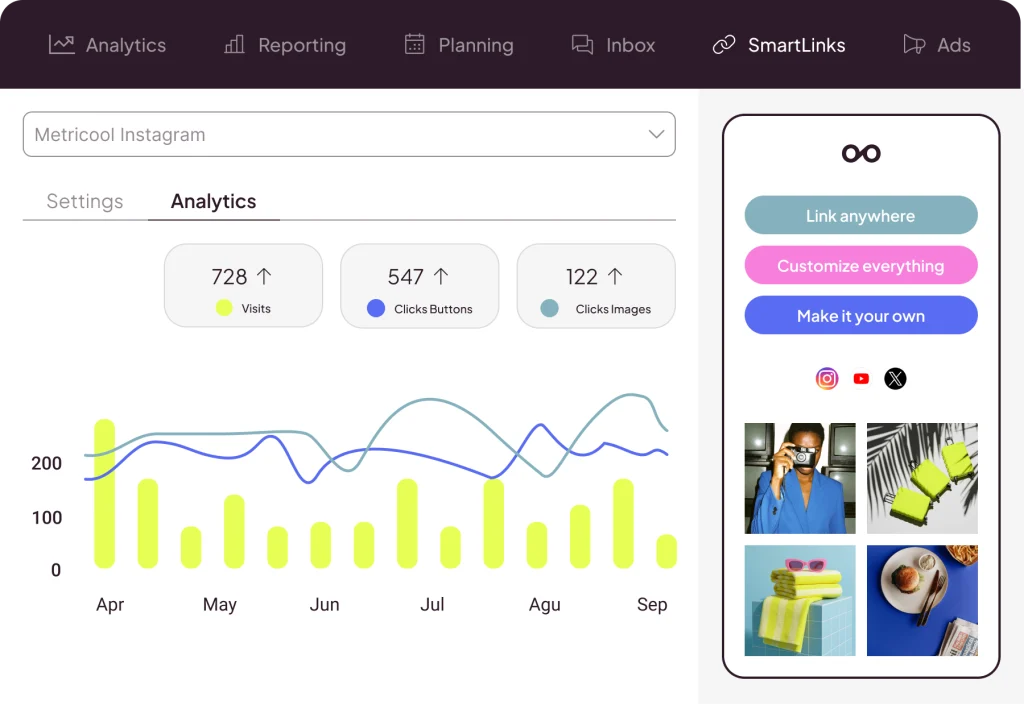
Metricool’s SmartLinks feature allows users to organize multiple destinations under a single shareable link.
Visitors can choose the destination that matches their needs.
This feature may be particularly useful for creators and businesses that direct visitors from social profiles to multiple resources.
SmartLinks is a paid feature, so check the current subscription details before planning around it.
Read the official SmartLinks guide:
Read the official SmartLinks guide
Creating social media content can be time-consuming.
Metricool offers AI-assisted features that can help users develop ideas and prepare text.
For example, you might use AI assistance to brainstorm topics or produce a first draft of a caption.
However, AI-generated content should be treated as a draft rather than an automatically finished marketing asset.
Before publishing, review its accuracy, tone, relevance, and clarity.
Add practical examples and remove unsupported claims.
AI can assist with the writing process, but understanding your audience remains important.
Metricool includes tools related to supported advertising platforms.
Depending on the available features and account configuration, you may be able to organize or monitor certain advertising activities alongside your other marketing work.
However, advertising tools are not essential for everyone.
If you’re a beginner who only needs to schedule organic posts, start with the basic planning and analytics workflow.
Metricool documents integrations for compatible AI clients, including a supported connection with ChatGPT.
Depending on the setup, permissions, and plan, these integrations can enable supported interactions with Metricool data and functions through an AI-assisted workflow.
For example, you might analyze recent content performance, develop ideas for related posts, and organize your next publishing plan.
The exact actions available depend on the connection and account permissions.
Read the official Metricool–ChatGPT integration guide:
Read the official Metricool–ChatGPT integration guide
Metricool offers a Free plan alongside paid plans designed for different types of users.
The right choice depends on your publishing volume, number of Brands, reporting requirements, and whether you work independently or with a team.
Pricing varies by billing option and Brand limit. Check the official pricing page for current prices before purchasing:
Metricool’s Free plan does not expire and does not require a credit card, according to its current help documentation.
Its listed limits include:
The Free plan does not include LinkedIn, several paid-only tools, SmartLinks, or downloadable PDF and PowerPoint reports.
Beginners, solo creators, and small websites that publish a modest number of posts may find it a sensible place to start.
Review the full plan comparison:
Review the full plan comparison
Starter is intended for people who need more capacity and additional functionality.
The official US pricing page lists Starter from $20 per month for some annual-billing options. The final price depends on the number of Brands and billing frequency.
Features may include more Brands, expanded publishing, longer analytics history, reports, LinkedIn access, and other capabilities, depending on the selected option.
Starter may be worth evaluating if you publish frequently or need features that the Free plan does not provide.
Advanced is designed for more demanding workflows.
Features listed by Metricool include team and client management, role permissions, post approval workflows, customizable reporting, and additional integrations.
The official US pricing page lists Advanced from $53 per month for some annual-billing options. Your final price depends on the selected Brand limit and billing option.
Advanced may be useful for social media managers, agencies, and businesses that coordinate multiple clients or collaborators.
The Custom plan is designed for specialized business requirements.
It offers a custom number of Brands and additional options for organizations that need more tailored integrations or white-label capabilities.
Contact Metricool directly to discuss the requirements and pricing.
These are starting recommendations, not guarantees that one plan will suit every user.
Check the current plan limits and features before subscribing.
If you want to manage multiple social media accounts in one place, you can explore Metricool and compare its features with your requirements.
Explore Metricool and compare the available plans →
A useful software review should explain both the advantages and the trade-offs.
Metricool has several attractive features, but its value depends on your specific requirements.
Metricool is worth evaluating if you want a more organized system for managing several recurring social media tasks.
Its main appeal is the combination of planning, scheduling, and performance review in one workflow.
However, beginners should start with the features they actually need rather than paying for an advanced subscription simply because it contains more tools.
You do not need to be a professional marketer to build an organized social media workflow.
The following steps explain the basic process.
Visit Metricool and follow the account-creation instructions.
If you’re new to social media management software, consider the Free plan when it meets your needs.
Start by learning the basic interface instead of trying to use every feature immediately.
Metricool uses the term Brand for a workspace associated with a business or client.
A Brand can contain one connected profile per social network.
For example, one Brand might contain a Facebook Page, Instagram account, TikTok profile, and Pinterest account.
If you manage different businesses or clients, separate Brands may be appropriate.
Your subscription determines how many Brands you can manage.
Connect the accounts you intend to manage.
The process varies by network, but it generally involves choosing the platform and completing the required authorization steps.
You must have the appropriate permissions for the accounts you connect.
After the process is complete, verify that the correct profile appears in Metricool.
If you manage multiple businesses, make sure each profile is associated with the intended Brand.
Before scheduling a large batch of new posts, examine what you’ve already published.
Review the available performance data for your connected accounts.
Look for patterns such as which topics attract attention, which content formats perform consistently, and which posts generate relevant interactions.
Write down a few lessons from the data.
Use those lessons to guide your next content plan.
Decide what you want your social media activity to accomplish.
Your objectives might include increasing awareness, driving website traffic, building an engaged audience, or generating enquiries.
A simple content plan could include:
Not every post needs to promote a product.
Useful educational content can help establish trust and give your audience a reason to return.
Open Metricool’s planner and create a new post for your selected network.
Write the caption and add the appropriate media.
For example, if you’re sharing an article about social media management, avoid a vague caption such as “Check out this great tool.”
“Managing several social media accounts can become a daily cycle of switching apps, uploading content, and checking results. A structured content calendar can help you organize your publishing schedule before the week begins.”
This gives the reader a reason to pay attention.
Do not assume the same caption will work equally well everywhere.
A Facebook post may need a conversational introduction.
A Pinterest Pin benefits from a descriptive title and an appropriate destination link.
A Threads post may work better as a concise discussion starter.
The central idea can stay consistent while the presentation changes to suit each platform.
Choose the intended publishing date and time.
Review the post preview, destination account, caption, and media before saving.
Confirm that the selected format supports your intended publishing method.
Some formats publish automatically, while others require manual steps because of platform-specific restrictions.
Read Metricool’s official scheduling instructions:
Read Metricool’s official scheduling instructions
After the scheduled time, check whether the content appears on the intended social media account.
Verify that the correct media and caption are visible.
If the post includes a website link, open it to confirm that it reaches the intended destination.
For important campaigns, keep a record of the published post and its URL.
If Metricool or the social network reports an error, follow the relevant troubleshooting guidance instead of assuming the post was published successfully.
After publication, examine the available analytics.
Choose metrics that match your objective.
If you want to increase awareness, review reach and impressions.
If you want people to read a blog article, examine available clicks and website visits.
If you want to encourage conversation, review relevant engagement indicators.
Avoid making large strategic decisions based on a single post or a short period of data.
Use what you learn to improve the next set of posts.
If practical tutorials consistently attract relevant engagement, create additional tutorials that address related problems.
If promotional posts receive attention but very few relevant clicks, examine whether the content and destination page match the audience’s expectations.
The objective is to build a continuous improvement cycle:
Plan → Publish → Measure → Learn → Improve
Metricool can help organize the workflow, while your marketing strategy determines what to do with the results.
AI tools can help with content brainstorming and writing, while Metricool can help organize the publishing process.
The tools serve different purposes.
ChatGPT can help you brainstorm topics, write outlines, draft captions, and adapt content for different audiences.
Metricool can help you organize and schedule supported posts and review the available performance information.
A practical workflow might look like this.
Start with a question your audience is likely to ask.
For example:
“How can a small business manage several social media accounts without spending hours publishing content every day?”
Use that question to develop useful content ideas.
Turn the strongest idea into a blog post, tutorial, or social media caption.
Make sure each piece of content answers a real question.
Check accuracy, clarity, and tone.
Remove unsupported claims and improve unclear sections.
Prepare an appropriate image, carousel, or video for the intended platform.
The visual should support the message rather than distract from it.
Add the finished posts to Metricool’s planner.
Select the appropriate profiles, dates, and publishing times.
Review the final previews before scheduling.
After publication, review the available analytics.
Identify the content that appears to attract the most relevant attention.
Use those lessons to improve future posts.
ChatGPT helps you develop ideas and drafts. Metricool helps you organize publishing and review available performance data. Your strategy connects the two.
Bloggers and affiliate marketers often distribute content across several channels.
A detailed website article can become the foundation for multiple social media posts.
For example, one article might lead to:
Metricool can help organize this publishing process for supported platforms.
However, there is an important distinction between publishing promotional content and generating affiliate revenue.
Scheduling more posts does not automatically generate more sales.
Successful affiliate content should answer real questions, explain the product clearly, and help readers make an informed decision.
Bloggers can use Metricool to organize the promotion of their website content across supported social media platforms.
For example, a single article can inspire a Facebook post, a Pinterest Pin, a Threads update, and a LinkedIn post. Each post can highlight a different takeaway while directing interested readers to the full article.
Instead of preparing every social media post at the last minute, bloggers can plan their content in advance and schedule posts for supported platforms.
Metricool’s publishing options and platform-specific limitations should be reviewed before building a workflow around scheduled content.
Metricool’s available analytics can help bloggers understand how their connected social media accounts are performing. Depending on the platform and available metrics, they can review engagement and other performance indicators to identify which content deserves more attention.
If you want to manage social media content from one place, explore Metricool’s features and compare its available plans to see whether they fit your workflow.
Metricool is not the only available option.
You may also want to compare platforms such as Buffer, Later, and Hootsuite.
Rather than assuming one product is best for everyone, compare the features you actually need.
Metricool is worth evaluating if you want to combine content planning, publishing, analytics, competitor research, and reporting.
Its Free plan also provides a way to evaluate basic functionality before paying.
Buffer may be worth considering if you want a publishing workflow centered on social media scheduling and content management.
Compare its supported networks, publishing limits, and analytics against your requirements.
Later may be useful if your workflow emphasizes visual-content planning and the social networks and formats it supports match your needs.
Hootsuite is another platform to evaluate if you need social media management capabilities for a business or team.
Compare its current publishing, analytics, and collaboration features with the alternatives.
Ask yourself:
The best platform is the one that solves your main problems without adding unnecessary complexity.
A social media management tool can help organize your workflow, but it does not automatically solve every marketing problem.
Every post should have a reason for existing.
Before scheduling it, decide what you want the audience to learn, consider, or do.
Different platforms have different formats and audience expectations.
Adapt your message instead of assuming that one caption will work equally well everywhere.
Before scheduling, check the text, images, destination account, and available preview.
Small mistakes can create unnecessary problems after publication.
Third-party publishing depends on the capabilities provided by each social platform.
Review the limitations for important formats before relying on them in a campaign.
Start with your essential requirements.
Upgrade only when a specific plan limitation prevents you from carrying out your intended workflow.
Likes can be useful, but they aren’t always the most important metric.
Choose measurements that match the purpose of your content.
The point of analytics is to improve your next decision.
Review the results and use them to refine your content strategy.
Metricool can help organize and analyze social media activities.
It cannot guarantee followers, engagement, traffic, or affiliate conversions.
Those outcomes depend on your content, audience, offer, website, and wider marketing strategy.
Metricool is a social media management and digital marketing platform. It helps users plan content, schedule supported posts, review available analytics, research competitors, and manage other marketing activities.
Yes. You can connect supported profiles within a Brand, subject to your plan limits. Each Brand can contain one profile per social network.
Yes. Metricool offers a Free plan that does not expire. Its current limits include one Brand, up to 20 posts per month, and 30 days of analytics history.
Metricool’s current help documentation states that the Free plan does not require a credit card or payment method. Check the official registration page for the latest details.
It supports automatic publishing for many formats, but not every format supports the same publishing method.
Some posts require manual steps because of social network API restrictions.
Metricool supports Instagram publishing for eligible connected accounts and formats. The exact process depends on the content type and applicable platform restrictions.
Yes. Beginners can start by connecting an eligible account, planning a few posts, and learning how the scheduling calendar works.
The Free plan can be a reasonable starting point when its limitations meet your needs.
No. It provides management and analytics tools, but follower growth depends on content quality, audience relevance, consistency, competition, and broader marketing decisions.
It can help organize social media content that promotes articles, tutorials, and product reviews across supported channels.
However, affiliate results also depend on audience relevance, content quality, website performance, disclosure practices, and conversion tracking.
Metricool documents an integration for compatible ChatGPT environments. Depending on the setup and permissions, it can support selected interactions with Metricool data and actions.
Review the official documentation for current requirements and capabilities:
Read the official Metricool–ChatGPT integration guide
Start with the Free plan if it supports the networks, publishing volume, and features you need.
Consider a paid plan when you need additional Brands, publishing capacity, reporting, integrations, or team-management features.
Check the current plan comparison before subscribing:
Managing several social media platforms can become difficult when content planning, publishing, and performance reviews are handled separately.
Metricool offers a way to bring many of those activities into one workspace.
Its main advantages include social media scheduling, a visual content calendar, analytics, competitor research, and additional tools for supported marketing workflows.
The platform may be useful for bloggers, creators, freelancers, small businesses, and agencies that want a more structured approach to social media management.
However, it is important to understand the limitations.
The Free plan has restrictions.
Some advanced features require paid subscriptions.
Publishing capabilities vary by social network.
And results depend on the quality of your content and your broader marketing strategy.
For beginners, the most sensible approach is to start with the features you need most.
Connect the relevant accounts, organize a manageable publishing schedule, and review the available analytics.
Then decide whether the platform genuinely improves your workflow.
You don’t need to purchase an advanced subscription immediately.
Choose a plan according to your requirements, rather than simply the number of features advertised.
If you want to manage multiple social media accounts more systematically, explore Metricool and compare the current plans and features with your requirements.
The goal isn’t to publish more content simply for the sake of publishing.
It’s to create a workflow that helps you publish useful content consistently, understand the results, and improve your strategy over time.
Affiliate disclosure: Odyfox may earn a commission if you purchase an eligible Metricool subscription through our affiliate link. This does not increase your purchase price. Please review Metricool’s official website for current pricing, features, and subscription terms.
Read the official scheduling guide
More useful reads selected by topic and subject.

Managing multiple social media accounts can quickly become overwhelming. You open Facebook to publish a post, switch to Instagram to upload another,…
Read article
Are you tired of duct-taping five different software applications together just to run your online business? You pay for Mailchimp to send…
Read article
Choosing the right platform for an online business can be difficult. You might need sales funnels, landing pages, email marketing, automation, and…
Read article